How to Build a Social Media Analytics Report That Works

Stop starting your social media analytics report with reach and engagement. That's the most popular advice in social reporting, and it's where executive reports fail. A viral complaint thread can lift interactions while customers stay unresolved, agents chase duplicates, and finance never sees a billing error buried in replies.
As a social ops lead, I've rebuilt this report around a harder question: Are customer-impacting issues being resolved correctly, faster than they arrive? What follows is the operating version, with formulas, thresholds, owners, and audit rules. It measures what was escalated, what was automated, and what wasn't escalated, so operational failure can't hide behind a healthy engagement rate.
Table of Contents
- Set the Objective and Scope Before Pulling Data
- Metric Definitions, Formulas and Reference Bands
- Clean and Tag Multi-Channel Data Step by Step
- Service Levels by Channel and Issue Priority
- Charts That Show Where Operations and Product Must Change
- Stakeholder Dashboards, Templates and Reporting Cadence
- Automate the Routine and Keep Humans on Final Calls
Set the Objective and Scope Before Pulling Data
An engagement-first report can tell you impressions went up. It can't tell you whether a charged-twice complaint on X reached finance, whether an outage surge got engineered, or whether an auto-closed DM reopened the next day. That's not a reporting gap. It's a design choice made before anyone pulled data.
Build backwards from one business objective. For a fintech brand with a care team across X, Instagram DMs, and WhatsApp, a workable objective is reducing unresolved customer-impacting issues. The cause-and-effect chain then writes itself: intake volume, tagging accuracy, routing time, first substantive reply, resolution, reopen rate, and only then downstream signals like repeat contact or churn risk from your CRM. If a metric doesn't predict a step in that chain, it doesn't belong on page one. Review that test on a set date, because tags and queues drift.

Pick the Unit of Analysis
Decide whether you're counting a post, a conversation, a customer, or an issue. One billing problem can produce dozens of posts, and one customer may write on X, Instagram, and WhatsApp about the same failed payment. Count posts and you'll report a crisis. Count deduplicated issues and you'll report one case with three sources. Executives need the second number, with the first kept as context.
State the Denominator
Platforms report accounts, not unique people. DataReportal's Digital 2025 Global Overview reported 5.24 billion active social media user identities in February 2025, equal to 63.9% of the global population, and cautioned that identities may not represent unique individuals because one person can hold multiple accounts. The same report found 97.3% of connected adults used at least one social network or messaging platform each month, and social platforms were used by 94.2% of internet users.
If your report can't say whether a number counts accounts, active users, or estimated individuals, it's not ready for an executive.
State geography, date range, platform coverage, and denominator on every page. A year-over-year jump can come from a new channel, duplicate accounts, or better measurement, not real growth. Finish with a one-page scope card listing the objective, unit of analysis, channels in scope, date range, exclusions such as brand-owned replies, a named owner, and the date the objective will be reviewed.
Metric Definitions, Formulas and Reference Bands
Don't debate charts before you lock definitions. This table is the contract for a social care focused social media analytics report. Every metric gets a formula, a reference band, and a reporting form that prevents speed from hiding poor work.
| Metric | Formula | Reference band | Report as |
|---|---|---|---|
| Noise-filtered share | Filtered items ÷ total ingested items | Track weekly trend, no fixed target | Percentage with filter audit sample |
| First-response time | Ticket created to first substantive reply, in minutes | Under 60 min world-class, 4 h good, 24 h acceptable | Median and P90 per channel |
| Auto-resolution rate | Cases closed without a human reply ÷ eligible cases | Set per issue type after baseline | Percentage with QA score beside it |
| Public-to-private handoff rate | Public complaints moved to DM ÷ public complaints | Set from your own baseline by channel | Percentage by channel |
| Reopen rate | Closed cases reopened within 7 days ÷ closed cases | Lower than previous period | Percentage, same cut as auto-resolution |
| Escalation accuracy | Escalations confirmed as the right owner ÷ total escalations | Set from reviewer sample baseline | Percentage from reviewer sample |
| Validated sentiment share | Messages tagged negative and confirmed on manual sample ÷ sampled messages | Agreement rate reported with it | Weekly percentage line |
| Proactive saves | Issues fixed before a public thread escalates ÷ detected issues | Set from detected-issue baseline | Count with linked case IDs |
Define First-Response Time Precisely
First-response time starts at customer submission or ticket creation and stops at the first substantive reply. State in writing whether automated acknowledgements, weekends, business hours, and priority exclusions count. Social-care benchmark guidance on response time definitions treats response within 24 hours as acceptable, within four hours as good, and within one hour as world-class, as target bands rather than universal averages.
One rule change moves the whole story. A DM that gets an automated acknowledgement at minute two and a human answer much later can read as fast or slow depending on whether the bot counts. I've seen teams celebrate the bot number while customers were still waiting. Publish both if you must, but label the substantive reply as the SLA.
Practical rule: Never publish auto-resolution without a QA score and reopen rate beside it.
Measure each channel separately. Don't blend social with email and chat, and don't report one average. Show median and 90th percentile per channel, plus response coverage and resolution outcome, because averages conceal the long-tail waits where complaints escalate publicly.
Two Guardrails for Automation Metrics
Treat noise-filtered share as a trend, not a target. If reviewers chase a higher filtered share, they'll filter real cases. Audit a sample of filtered and SLA-met interactions for helpfulness and correct routing instead.
Apply the same discipline to handling time inside queues. If you track agent handling alongside first response, SignalZen's guide to call center AHT is useful context for why handling time needs its own definition rather than being folded into response time. Keep the clocks separate, or nobody can tell whether a delay sits in triage, routing, or the reply itself.
Clean and Tag Multi-Channel Data Step by Step
Clean data isn't a back-office task. It's what decides whether a billing complaint reaches finance or sits in a general mention stream until it goes public again. The flow below shows the first three moves. The full sequence has seven steps, and skipping the last one is where most reports break down without warning.
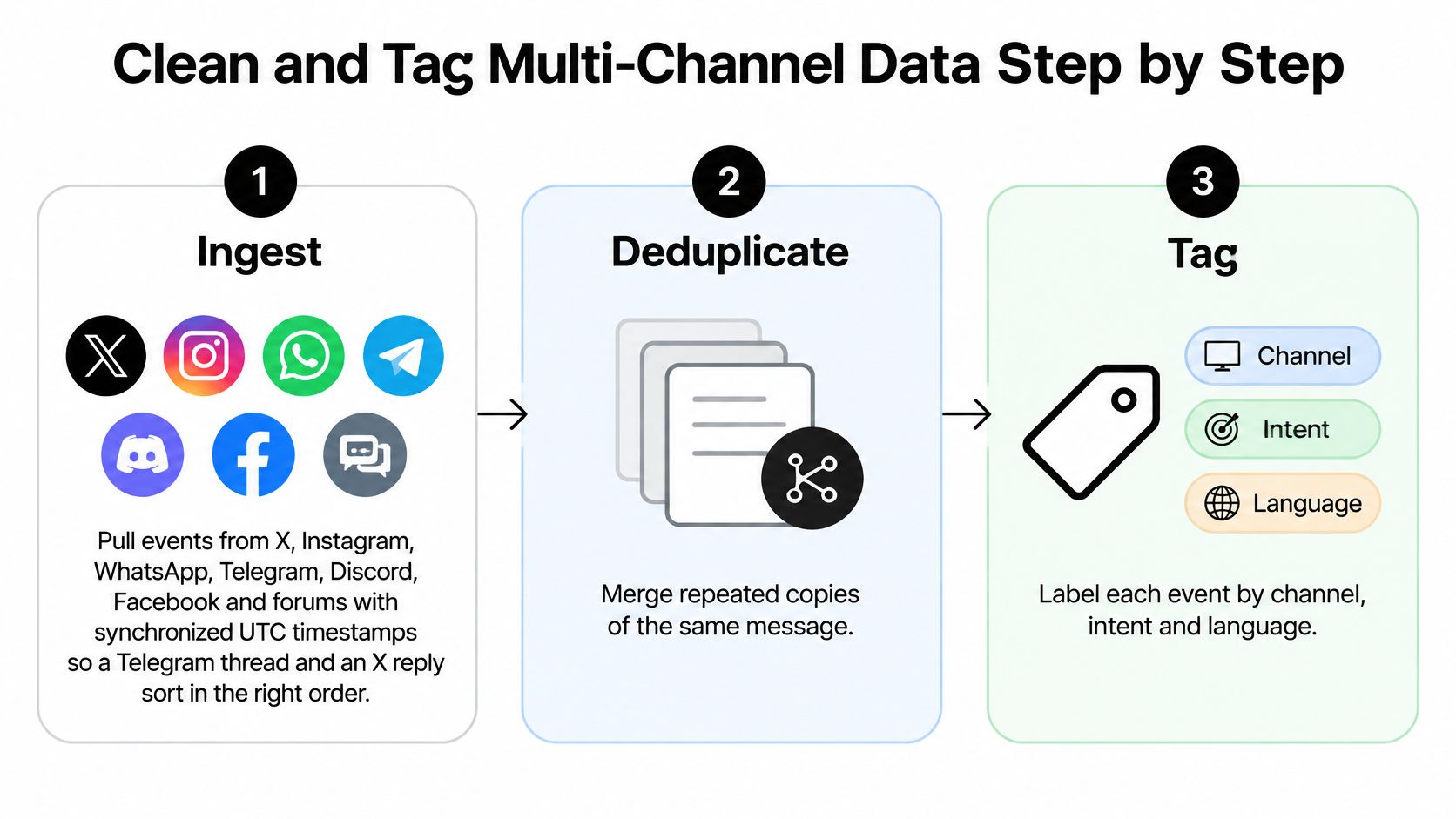
Ingest with synchronized UTC timestamps. Pull events from X, Instagram, WhatsApp, Telegram, Discord, Facebook, and forums into one log. Without a common clock, a Telegram thread and an X reply sort in the wrong order and your response-time math is fiction.
Deduplicate reposts and cross-channel copies. Merge repeated copies before you count anything. One outage screenshot shared on X, Facebook, and a Discord server should count as one case with three sources, not three outages.
Filter noise, and keep the count. Remove giveaway scams, bot replies, and off-topic brand mentions from the working queue. Keep the filtered count per week so the filter itself can be audited. A filter nobody audits will eventually swallow a real account-takeover report.
Tag intent, urgency, and language. Use a fixed taxonomy covering billing, outage, feature request, account access, praise, and scam. Multilingual slang and sarcasm need this step most. In a gaming server, a slang phrase can be praise. In a complaint thread about checkout, the same words can signal anger.
Assign an accountable queue. Route each case to support, finance, engineering, comms, or trust and safety, and log every ownership change with its timestamp. A case bounced from support to finance without a log looks fast on paper and feels abandoned to the customer.
Calculate from event logs, not exports. Derive time to first substantive reply and time to resolution from the logged events. Exported summaries from four native tools will disagree on time zones, deleted posts, and what counts as a reply.
The walkthrough below shows how multi-channel intake looks when those events land in one place.
- Validate tags against a manually coded sample. Check automated classifications every month, per language and per channel, and record the agreement rate before any tag enters a chart. Teams that skip this usually discover misclassified billing cases only when finance asks why a number moved.
What Good Tagging Buys You
With intent, urgency, language, channel, and ownership on every case, you can segment by platform, market, severity, and queue without rebuilding the report. That's the difference between a unified inbox that supports triage and a folder of screenshots. It also protects reviewers. When noise is filtered and duplicates are merged, agents spend their attention on high-intent cases instead of burning out on spam waves.
A tag that hasn't been validated against human coding is a guess with a chart on top of it.
Watch for ambiguity, multiple content types, and timeliness differences across platforms. A meme image, a sarcastic quote post, and a plain text complaint don't fail in the same way, so your sample needs all three. If agreement drops in one language, pause reporting for that language rather than averaging the error away.
Service Levels by Channel and Issue Priority
A single channel-wide average is how a team hits its SLA while its worst public complaints wait. Public complaints carry higher stakes than routine questions, and customers don't expect the same speed everywhere. Customer-service research on social response expectations reports that 53% of customers expect a response on X within one hour, rising to 72% for complaints, while 76% expect a response within 24 hours across social platforms.
Channel norms differ too. ICMI's review of social customer service expectations, published in 2018, cited 64% of Twitter users expecting a response within one hour, compared with 60% of Facebook users expecting one within four hours, and 85% of Facebook users expecting an answer within six hours. Those figures are old enough to treat as a historical floor rather than a current benchmark. Replace them with your own baseline once you have four weeks of tagged data. One global target ignores both channel norms and complaint severity.
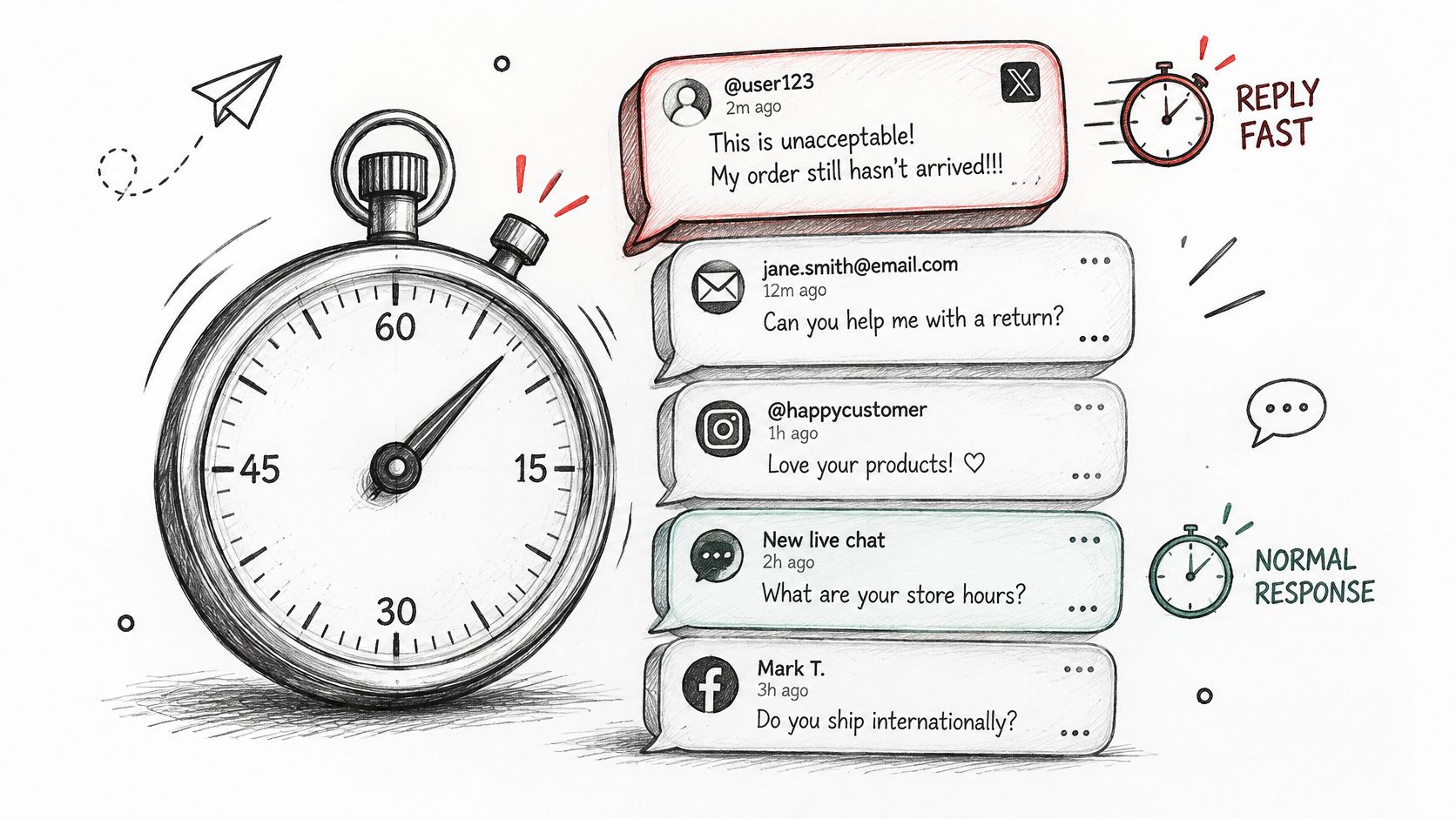
Every target below measures the first substantive reply, the same definition used for first-response time earlier in this report. An automated acknowledgement does not stop the clock.
| Priority tier | Example | First-response target | Owner | Report cadence |
|---|---|---|---|---|
| P1 Outage or safety | Outage surge on X, account-takeover reports | 1 hour on every in-scope channel | Engineering and comms | Real-time breach alert |
| P2 Billing or public complaint | Charged twice, complaint with screenshot | 1 hour on X; 2 hours on Facebook and Instagram; 4 hours on WhatsApp | Finance | Daily |
| P3 Account question | Password reset request on Facebook | 4 hours on all channels | Support queue | Weekly rollup |
| P4 Feature request | Dark mode request in a DM | 24 hours, substantive reply | Product | Monthly theme review |
| P5 Spam or off-topic | Crypto giveaway reply | Auto-handled, no response SLA | Trust and safety sample | Weekly sample audit |
Any channel not named in a tier defaults to 4 hours, so a complaint arriving through an unmapped channel never falls outside the SLA. Adjust the per-channel bands after your baseline; the numbers above are starting points, not industry law.
Run the Tiers, Don't Just Publish Them
When a public complaint moves to a private DM, keep the public thread in the case record. The customer raised the problem in public and wants visible acknowledgement before going private. If your unified inbox strips that context, the agent in DM starts blind and the public thread keeps growing.
Set cadence by tier. P1 gets real-time breach alerts, P2 gets daily reporting, and P3 and P4 roll up weekly or monthly. Run a four-week baseline before locking targets, then adjust where breaches cluster. If P2 breaches concentrate on weekends, that is a staffing decision for the weekend queue.
Count what never got escalated. P1 and P2 cases that sat in the general queue past their target are operational failures, and a strong engagement rate will hide them completely. The breach report should name the tier, the channel, the owning team, and how long the case waited, because that is the list your next staffing or routing decision comes from.
Charts That Show Where Operations and Product Must Change
Every chart gets one question and names the decision it should trigger. If nobody can say what changes when a line moves, cut the chart. Reach and engagement tell executives the audience was loud. They say nothing about whether customer-impacting issues were resolved, escalated to the right team, or left sitting in a queue while the engagement numbers looked healthy.
Social is now a routine place for people to talk about service, so the stakes are operational. Teleperformance Business Insights Lab's global consumer survey found that in 2023, 40% of consumers said they had posted about a brand's customer service on social media during the previous 12 months. Your charts describe public service performance, not marketing reach.
Two Illustrative Scenarios Where the Chart Has to Move People
Take an outage scenario as a worked example. Volume by intent on X climbs sharply within an hour, stacked heavily toward outage. The correct chart triggers action: staff shift onto the queue, engineering gets paged, and comms drafts a holding statement with a named owner for the next update. That chart is stacked by intent, because total mentions would bury the outage inside normal brand chatter.
Now a billing scenario, also illustrative. Complaints cluster after a plan price change. A ranked bar by product shows which plan is driving contacts, and the linked cases show customers quoting the same confusing line on the pricing page. If the loop works, finance reviews the charges and the copy gets corrected promptly. Without the product cut, nothing upstream changes and the same complaints keep arriving.
Add the Outcome Overlay
A volume line can look healthy while customers keep failing. Buffer's social customer service research summary reported that only 36% of consumers who make customer-service enquiries through social media say their issue is solved quickly and effectively. Pair every volume chart with a resolution or reopen line, and add a missed-escalation count: cases that should have moved to engineering, finance, or trust and safety but stayed in the queue. That count is what a high response rate hides.
| Metric | Best chart | Decision it triggers | Common misread |
|---|---|---|---|
| Volume by intent | Stacked area by day | Staffing shift for an outage surge | Total spike may be one viral post |
| Response time | Median and P90 bars by channel | Re-route a queue or add cover | Average hides the long tail |
| Validated sentiment | Line of confirmed negative share | Brief comms when share jumps | Sarcasm and memes read as positive |
| Billing complaints by product | Ranked bar with weekly trend | Send to finance, fix pricing copy | Volume is not revenue impact |
| Auto-resolution by issue type | Bar with reopen overlay | Expand or pause an automation rule | High rate with rising reopens means poor fixes |
| Missed escalations | Count bar by target team | Review triage rules with the ops lead | Zero misses may mean the rule is never tested |
| Feature requests in DMs | Ranked theme bar with quotes | Product backlog review | One loud user can inflate a theme |
| Repeat contacts | Line by issue family | Root-cause fix with product or ops | Confusing repeat contacts with new issues |
Only plot the negative share that has been confirmed on the manual sample. Keyword sentiment misreads sarcasm and memes, and comms will brief on noise. Before any trend goes to executives, open the top cases behind the spike and read them. One viral post can create a spike that is not a broken process, and one screenshot thread can matter more than a quiet week of averages.
Stakeholder Dashboards, Templates and Reporting Cadence
Build one data model and cut it into stakeholder views. Separate exports from X, Instagram, and WhatsApp will disagree by Friday, and the meeting becomes an argument about whose spreadsheet is right. The social media analytics report template needs four parts. Start with a headline strip of three numbers, then an exceptions list of cases that breached their tier or were escalated, then a decisions-needed block with named owners, then an appendix with definitions, sample sizes, and the date range.
Put the Capacity Gap on the Executive Page
Executives should see the gap between what customers expect and what the team can resolve. The consumer research behind Sprout Social's social customer service statistics shows how wide that gap runs: most consumers expect a brand to respond on social within a day or sooner, a majority of those who reach out publicly want a public acknowledgement before being moved into a private conversation, and a large share say they will take their business to a competitor when a brand stays silent. Actual brand response rates on social sit far below those expectations, and they have been slipping rather than closing.
That gap makes response rate, unresolved-complaint backlog, and public-to-private handoff rate executive metrics. It also justifies noise filtering in operational terms. Without filtering, reviewers burn hours on low-value mentions while high-intent support cases wait, and a dashboard that leads with engagement can look healthy while the backlog steadily doubles.
| Stakeholder | Lead metrics | Cadence | Format |
|---|---|---|---|
| Social care lead | Queue backlog, P90 response time, reopen rate | Daily | Live dashboard |
| Community manager | Theme clusters, spam-wave count, moderation load | Daily | Email digest |
| Comms and PR | Crisis-level mentions, negative share change, pending approvals | Real-time alerts | Alert with thread links |
| Product | Ranked feature-request themes, bug reports by app version | Weekly | Ranked list with quotes |
| Finance | Billing complaint count, refund requests, affected plans | Weekly | Table by plan |
| Trust and safety | Scam-wave volume, account-takeover reports | Daily | Alert queue |
| Executives | Auto-resolution, proactive saves, CRM-linked churn risk | Monthly | One-page summary |
Notice what that last row does not lead with: reach, impressions, engagement rate. Those numbers can climb while escalations stall and resolved cases reopen at record rates. The executive page reports whether customer-impacting issues were fixed correctly, what was escalated, what automation handled, and what should have been escalated but was not. That is the operational failure a strong engagement rate hides.
Cadence has two drivers. The stakeholder cadence above decides who sees each number. The tier cadence decides when a breach triggers an alert regardless of the reporting day. Keep them separate, or a P1 outage waits for the weekly rollup.
Keep role-based permissions in place. A finance user should see billing cases without personal data from trust and safety investigations. Comms alerts should link to source threads rather than copied text, so context and edits stay visible. Permissions decide whether sensitive cases can be shared safely at all.
Automate the Routine and Keep Humans on Final Calls
Automation earns its place when it removes sorting work, not judgment. Draw the boundary in writing: AI runs noise filtering, intent and language tags, duplicate merging, draft replies for simple questions, the weekly report build, and alerts when a tag's volume moves sharply against its four-week baseline. That is orchestration. It clears manual triage so people can handle cases that carry legal, financial, or reputational weight.
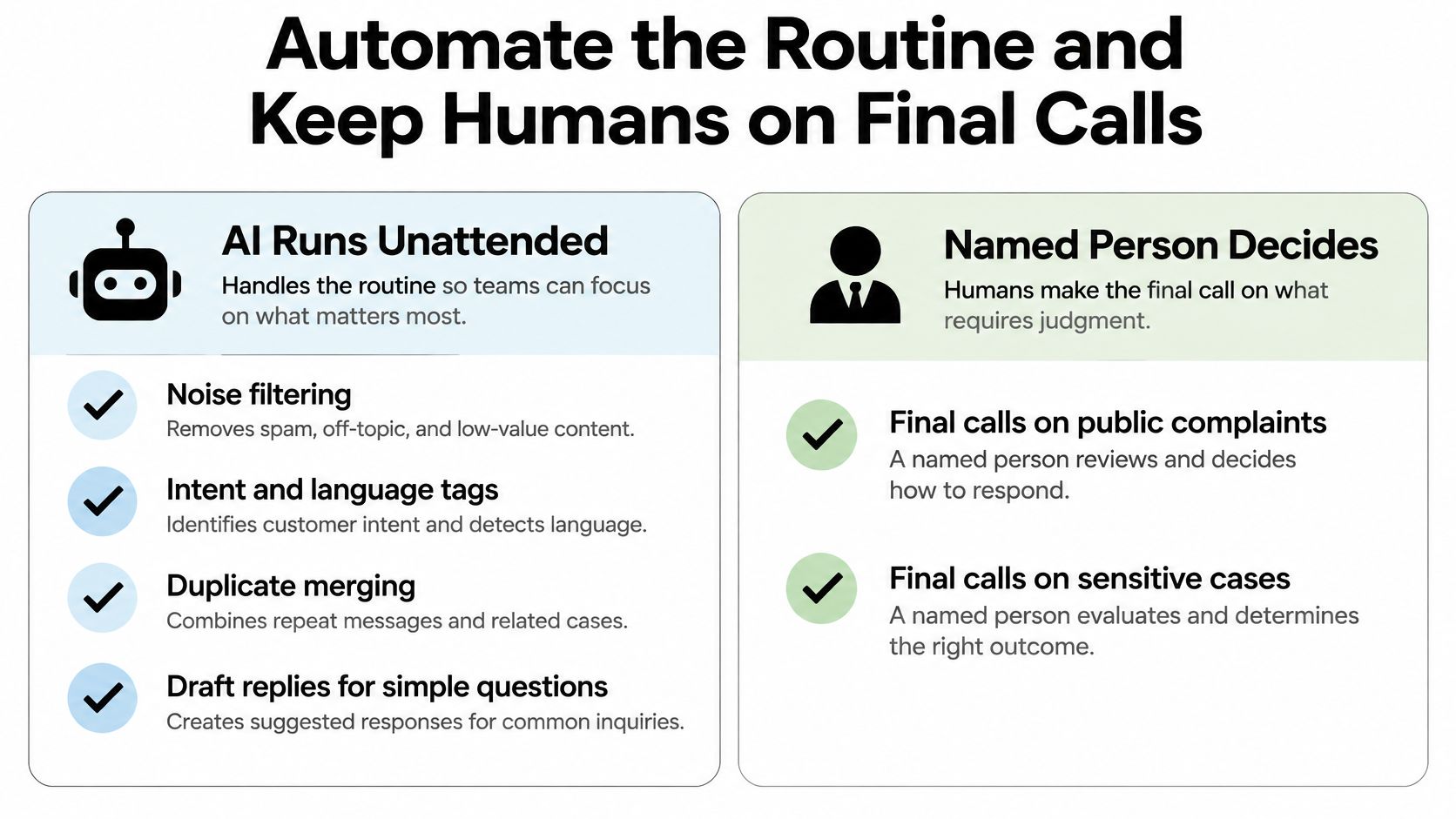
Humans keep billing disputes, public apologies, crisis statements, outage updates, refund exceptions, and any case a customer frames as legal. A drafted reply is still a draft. The named owner approves it in brand voice, decides escalation to finance, engineering, or comms, and owns the outcome if the case reopens.
Audit the Automation or It Will Drift
Sample auto-closed cases every week for correctness. Track reopen rate per automation rule alongside the portfolio average, so one bad rule cannot hide inside healthy overall numbers. Give one person authority to pause each rule without a meeting.
Reviewer fatigue is the quieter failure. If approvers rubber-stamp drafts all day, auto-resolution rises while quality falls. Cap daily approvals per reviewer and sample their decisions with the same rigor used on AI tags.
Before a rule goes live, require four checks:
- Logged owner: every automated action has a named owner in the log.
- Listed human categories: every human-owned category is written down, not assumed.
- Reopen line attached: every auto-closure rule reports with its reopen rate.
- Single pause control: one named person can pause the rule immediately.
Start narrow. Pick one priority tier, run the four-week baseline with the definitions above, then ship the first dashboard. Sift AI's unified inbox handles tagging, routing, and exports in one place across social and community channels, so the baseline does not depend on spreadsheets assembled by hand from four platforms.
Rebuild the next social media analytics report around resolved issues, escalation accuracy, and auditable automation. Reach can look healthy while customers are still waiting for correct fixes. Visit Sift AI to see how your team can run the four-week baseline without stitching together platform exports.