Auto Tagging Facebook: Setup Steps, Rules and Queues
A billing complaint lands under your Page post at 9:12 a.m.: "@YourBrand my card was charged twice and the app won't open." Your reviewer has three minutes before the next comment, a journalist is already in the mentions, and a scam account is telling people to "DM me to recover." If you treat that as one Facebook tag, you'll notify the wrong person, hide a real refund request, or leave engineering blind to an outage.
Auto tagging Facebook only works when you split three jobs that Meta's own controls mash together. A public tag or @mention is an intake signal. A keyword blocklist or profanity filter is a visibility control. Intent, urgency, and owner live only as internal labels in your inbox. People still approve refunds, public status text, and anything that touches safety, legal risk, or money.
Table of Contents
- Facebook Tags Versus Internal Labels
- Build a Tag Taxonomy and Queue Map
- How to Set Up Auto Tagging Step by Step
- Rule Examples With Conditions and Precedence
- Where AI Improves Accuracy and Where People Decide
- Confirm the Setup Before You Switch Routing On
Facebook Tags Versus Internal Labels
The expensive mistake is hearing "auto tag" and reaching for Facebook's Tag Photo control. A person or Page tag is not a queue. It creates a profile link, can notify that account, may place the post on a timeline, and can widen who sees it to that person's friends. An @mention is the same family of action. Facebook's help on mentions describes it as a clickable link whose visibility follows the mentioned account's privacy settings. The mentioned person, Page, or group may get a notification, and the content may show on that person's timeline.
Neither action tells you whether the comment is a billing dispute, an outage, or a scam. "@YourBrand my card was charged twice" is a mention of your Page. It opens a record. It does not say finance owns the charge and engineering owns the login failure.
Five controls, three jobs
| Mechanism | What it does | Visible or notifies? | Use for auto-tagging? |
|---|---|---|---|
| Person or Page tag | Creates a profile link and can add the post to that person's timeline | Yes, can notify and widen visibility to friends | No, reserve for public identity only |
| @mention of a Page or group | Creates a clickable link to the mentioned account | Link visibility follows the mentioned account's privacy; notification possible | Intake signal only |
| Page keyword blocklist | Hides matching comments on content the Page created | Hidden from the public; visible to the author and their friends | Yes, for spam and scam hiding |
| Profanity filter (Medium or Strong) | Hides commonly reported offensive words | Hidden from the public; visible to the author and their friends | Hiding only, never intent |
| Internal tag in your inbox | Labels intent, urgency, topic and owner | Never published | Yes, this is the core of auto-tagging |
Practical rule: Nothing public is applied automatically. Mentions become intake. Hiding stays a visibility control. Intent, urgency, and owner stay inside the inbox.
A strong word in a refund comment is not a reason to drop the case. The native filter can hide that comment from the public while the author and their friends still see it. Your finance queue still needs the item, or the customer thinks you ignored a double charge.
Before you build a rule, label each mechanism: intake signal, visibility control, or internal label. If you can't name which of the three it is, don't automate it.
Build a Tag Taxonomy and Queue Map
Write the tag set before you write a single rule. Two kinds of tags keep queues honest.
Queue tags decide ownership and never overlap. One message has one destination. Attribute tags describe the message and can stack, so the same comment can be billing-dispute and angry without sending it to two teams.
Start with seven queue tags. Add another only when a named team will act on it this week. Every extra tag is reviewer load you pay for in missed SLAs.
Name them so two reviewers agree
Use lowercase, hyphenated names. Each tag gets one owner, a one-sentence definition, and two example messages. That stops Tuesday's reviewer calling a thread "payment issue" while Wednesday's reviewer calls it "refund."
If the destination is still a shared spreadsheet, fix that before you automate. A plain guide to CRM systems for Brisbane small businesses is a useful check that the queue you name can actually receive a ticket, with an owner and a status, rather than dying in a Facebook notification.
| Tag | Example signal | Destination | Automatic action | Human gate |
|---|---|---|---|---|
| billing-dispute | "charged twice", refund, invoice, "why is this charge here" | Finance support | Tag, route, hold a reply draft | Agent approves any refund promise |
| outage-report | "app down", "can't log in", error codes, spike of similar comments | Engineering on-call with support macro | Tag and cluster by time window | Comms approves public status text |
| pr-risk | Journalist or press mention, boycott language, screenshot shared from a thread | Comms or PR | Escalate and block auto-reply | Comms lead decides every response |
| scam-or-spam | Fake support account, "DM me to recover", phishing link | Trust and safety | Hide via blocklist and tag | Weekly sample review of hidden items |
| urgent-safety | Threats, self-harm language, harassment of staff | Trust and safety on-call | Escalate immediately, skip auto-close | Person decides every action |
| feature-request | "Please add", "would love", a named product feature | Product backlog | Tag and group similar requests | Product reviews the batch weekly |
| mention-intake | @mention with no problem terms | Social triage | Tag and log, no urgency | Triage lead spot-checks |
Finance owns money. Engineering on-call owns broken product behavior. Comms owns anything a reporter or a boycott thread could amplify. Trust and safety owns scams and urgent safety, and those two tags do not share a person on a quiet afternoon if your volume justifies a split. Product gets feature requests as a weekly batch, not as interrupts. mention-intake is the bucket for @mentions with no problem terms, logged without urgency so social triage can spot-check rather than treat every hello as an incident.
Don't go live on a tag that has no accountable owner. A rule without an owner is a pile.
How to Set Up Auto Tagging Step by Step
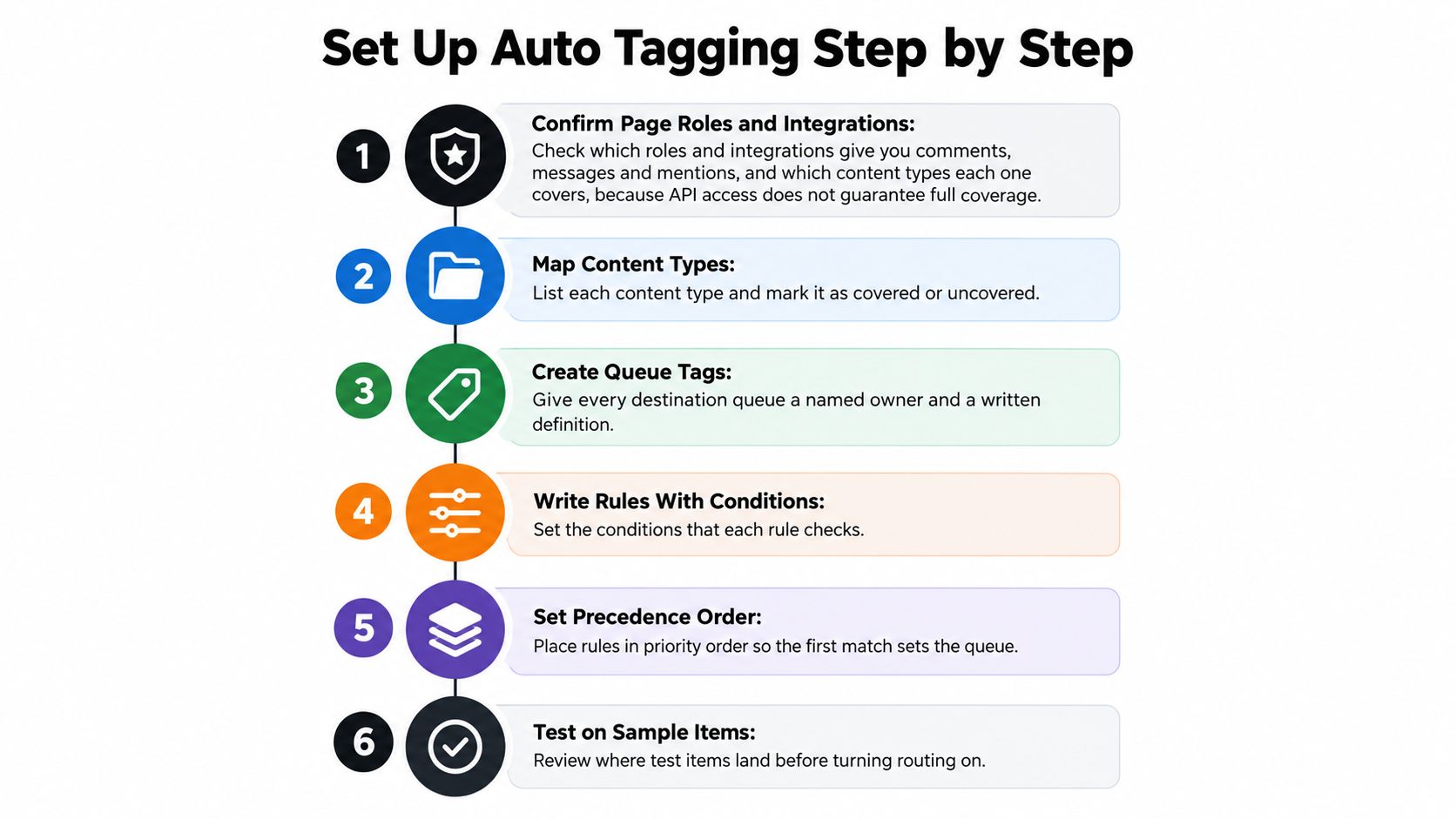
Confirm coverage before you trust a count. Page roles and integrations are not the same thing as a complete feed.
Get the sample, then the controls
- Confirm Page roles and integrations. Check who can see comments, Messenger, and mentions, and list which content types each connection returns. API access does not mean you have collaborator posts, visitor posts, or every ad comment.
- Export 60 to 90 days into one time-ordered file. Recent campaigns and meme spikes will dominate a short window and teach your rules the wrong week. Keep the order. Random shuffles leak the same thread into both training and test.
- Hand-label about 500 items. Apply the queue tag and any attribute tags, and log every disagreement between reviewers. Those disagreements are your taxonomy bugs, not "noise." Fix the definition before you automate the fight.
Hide spam without calling it intent
- Build the Page blocklist, up to 1,000 keywords. Facebook's Page moderation help says a Page can hold up to 1,000 keywords in any language, including phrases and emoji, and that matching comments on content the Page created are hidden automatically. Common misspellings, plurals, abbreviations, and number or symbol swaps are detected without counting against that 1,000. The same setting does not touch comments on other people's posts, or posts where your Page is only a collaborator. Cover that gap with inbox rules, or those threads never get hidden and never get tagged.
- Upload scam phrases as a CSV once the list runs to hundreds of lines. Typing "DM me to recover" variants by hand is how a Friday scam wave outruns you. Keep fake-support names, phishing phrases, and giveaway bait in one file a trust-and-safety owner edits.
- Set the profanity filter to Medium, then sample it. Hidden comments stay visible to the author and their friends. Once a week, read a sample of what got hidden. A billing complaint full of strong language is still a billing complaint. Strong is a later choice, not the default, because it hides more legitimate anger.
Prove the rules before they route anyone
- Enter rules in priority order and replay them on the labelled 500. You're looking for the first-match queue and for attribute tags that should have stacked. Note every item where two reviewers had already disagreed.
- Shadow mode for two weeks. Compare machine tags with human labels. Turn live routing on only for tags that clear the floors you set. Leave the rest as suggestions.
I would not turn on live routing for safety, press, or outage tags in week one. Shadow mode is cheaper than a wrong public reply.
Rule Examples With Conditions and Precedence
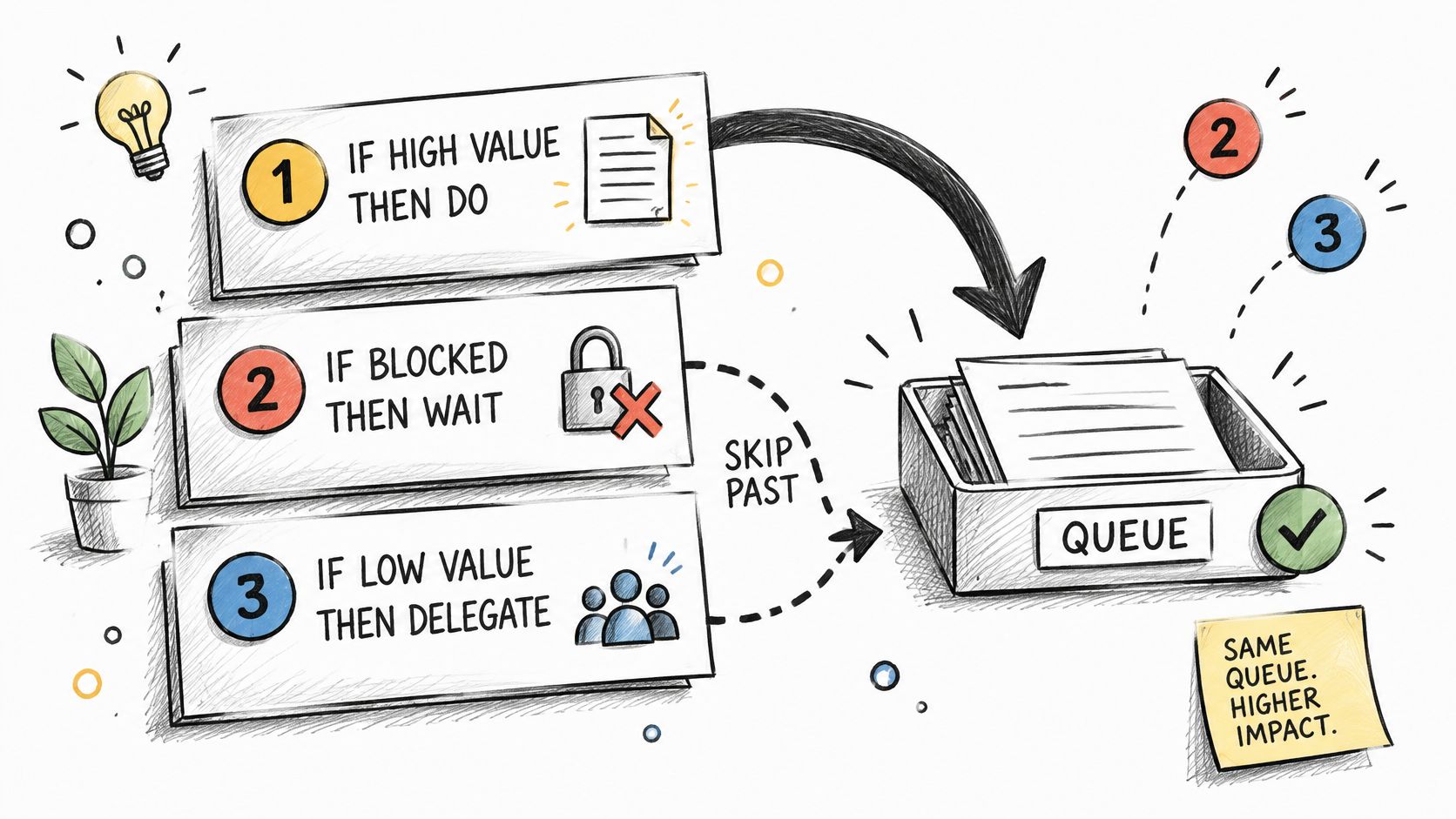
Rules run in priority order. The first matching rule sets the destination queue. Every matching rule may add attribute tags. A later rule never strips a tag a higher rule already applied.
Safety sits above scam hiding. Scam hiding sits above billing and outage. Press, feature requests, and the default mention bucket come last. That order exists so a threat inside a refund thread is not "a finance item with spicy language."
One comment, two true labels
Say the comment is "your app has been down all morning and I want my money back." It matches the outage cluster and the billing rule. Destination should be outage-report, with billing-dispute attached. Engineering sees the incident. Finance still gets the refund request. If billing won the queue instead, on-call would hear about the outage only after someone noticed a pile of payment tickets.
The native profanity filter can hide that same comment when the customer swears. The billing rule has to look at hidden items, or finance never sees the charge.
| Rule | Conditions checked | Tags applied | Outcome |
|---|---|---|---|
| 1. Safety first | Threat or self-harm terms in any language | urgent-safety | Escalate to trust and safety on-call; no auto-close |
| 2. Scam wave hide | Blocked phrase such as "DM me to recover" or a phishing link in a reply | scam-or-spam | Hide via blocklist and add to scam queue |
| 3. Billing complaint | "refund" or "charged" with or without a strong word | billing-dispute, plus angry if strong words are present | Route to finance; check hidden items because the native filter may already have hidden it |
| 4. Outage cluster | Five or more comments with "down", "error" or a status code within 30 minutes | outage-report | Open an incident thread; send the support macro after comms approves |
| 5. Press mention | Mention from a media account or words such as "reporter" or "editor" | pr-risk | Comms queue; auto-reply disabled |
| 6. Feature request | "Please add", "would love" or a product noun in a direct message | feature-request | Product backlog, deduplicated weekly |
| 7. Default mention | @mention matching no other rule | mention-intake | Social triage with no urgency |
Write every rule the same way: if these conditions match, add these tags, route here, unless one of these exceptions applies. Exceptions are short. A known journalist handle skips the feature-request rule even if they say "would love a comment." A staff-harassment report skips auto-close even if it also matches spam.
The outage rule is a cluster, not a single keyword. One person saying "down" on a Tuesday is a support ticket. Five in thirty minutes is an incident, and the public status line waits for comms. Auto-reply on a press mention is how a draft macro becomes the quote.
Where AI Improves Accuracy and Where People Decide
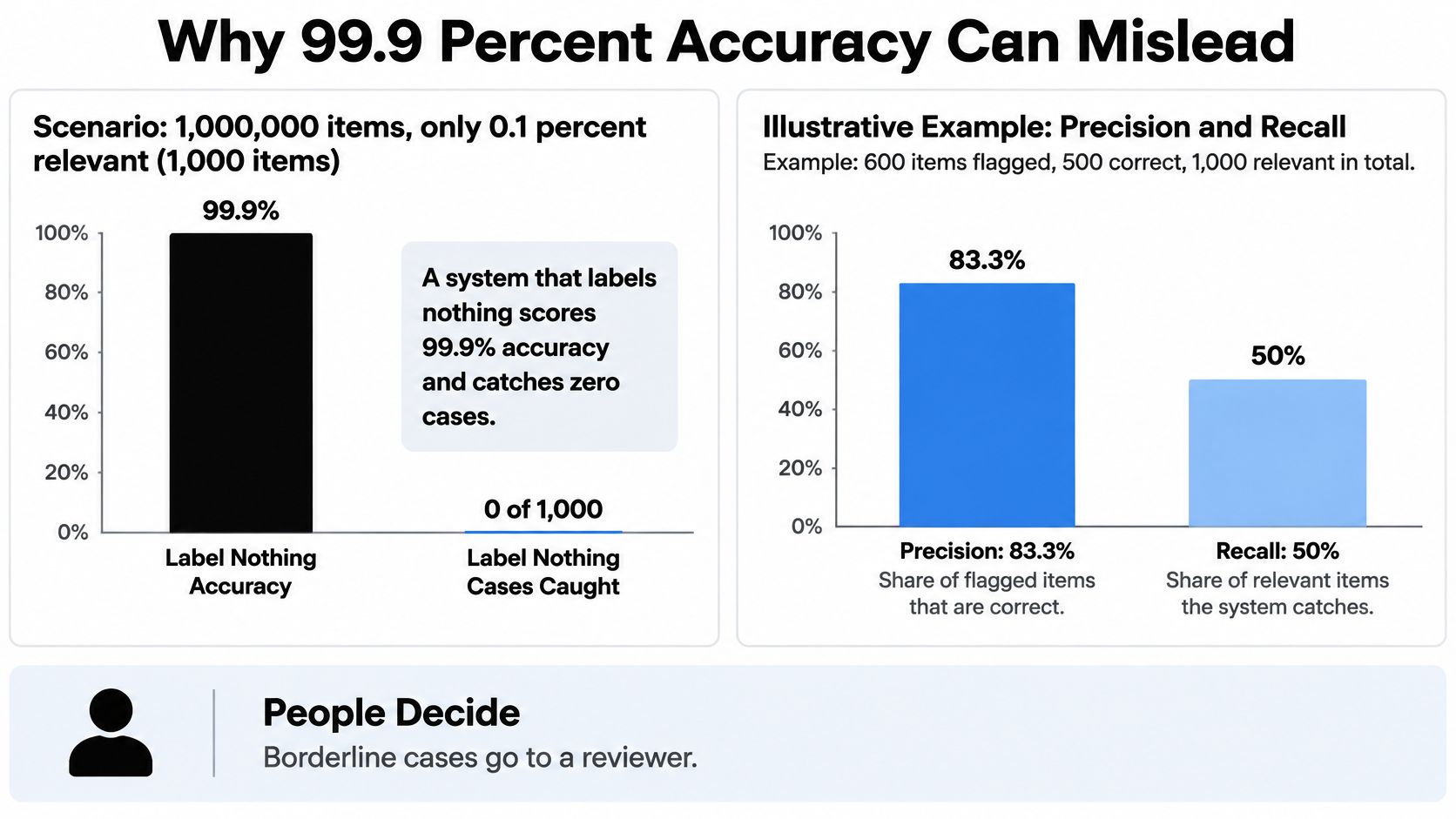
Headline accuracy will flatter you. In a stream of one million Facebook items where only 0.1% are relevant, a system that labels nothing scores 99.9% accuracy and has zero recall, which is why evaluation guidance for moderation-style classifiers tells you to report precision, recall, and F1 per label instead of one accuracy number.
A worked cost, not a scoreboard
Say a tagger flags 10,000 posts as escalation-worthy and 9,500 are correct. Precision is 95%. If 12,000 such posts exist, recall is 79.2%. You still review 500 false positives. You also miss 2,500 items, and those misses often cost more than the extra reviews.
Same pattern, different stakes. A sarcastic "love waiting 40 minutes to pay" plus a screenshot of a failed charge is not one keyword. Keyword rules miss the joke and miss the image. A model can read both and still be wrong, so conflicting signals go to a person rather than a forced tag. A platform such as Sift AI can show the confidence and the snippet or image behind the tag, next to simpler keyword tools, so the reviewer sees the reason instead of a bare label.
The same evaluation note records severe language failures in public moderation reporting: a 77% incorrect-deletion rate for some non-violent Arabic content, and automation taking down only 0.2% of certain hate-speech content in Afghanistan. Those figures are moderation examples, not your auto-tag benchmarks. They are why you validate each language on its own labelled sample before you auto-route or auto-close.
Delegating the first pass only works if the person who owns the outcome can still overrule it. Teams that preserve referral judgment with SourceX are solving the same split: screening can be handed off, the decision cannot.
| Tag | Priority | Precision floor | Recall target | Below threshold |
|---|---|---|---|---|
| urgent-safety | Recall first | 80% | 95% | Send to human queue; never auto-close |
| pr-risk | Precision sensitive | 95% | 70% | Route to comms; every flag reviewed |
| billing-dispute | Balanced | 85% | 80% | Route to finance; agent confirms |
| outage-report | Balanced | 85% | 80% | Keep in support queue; cluster manually |
| scam-or-spam | Hide only after sample check | 95% | 80% | Sample review before wider hiding |
| feature-request | Low stakes | 75% | 60% | Batch review in product queue |
| mention-intake | Low stakes | 70% | 50% | Default triage; no action |
These floors are starting points for your own labelled set, not a universal score. Set them per tag. Read human overrides every month. A tag that reviewers keep flipping is a definition problem or drift, not a reason to hire another person to click the same override.
Confirm the Setup Before You Switch Routing On
Go live first on billing-dispute and mention-intake, where a wrong tag is a reroute, not a headline or a missed threat.
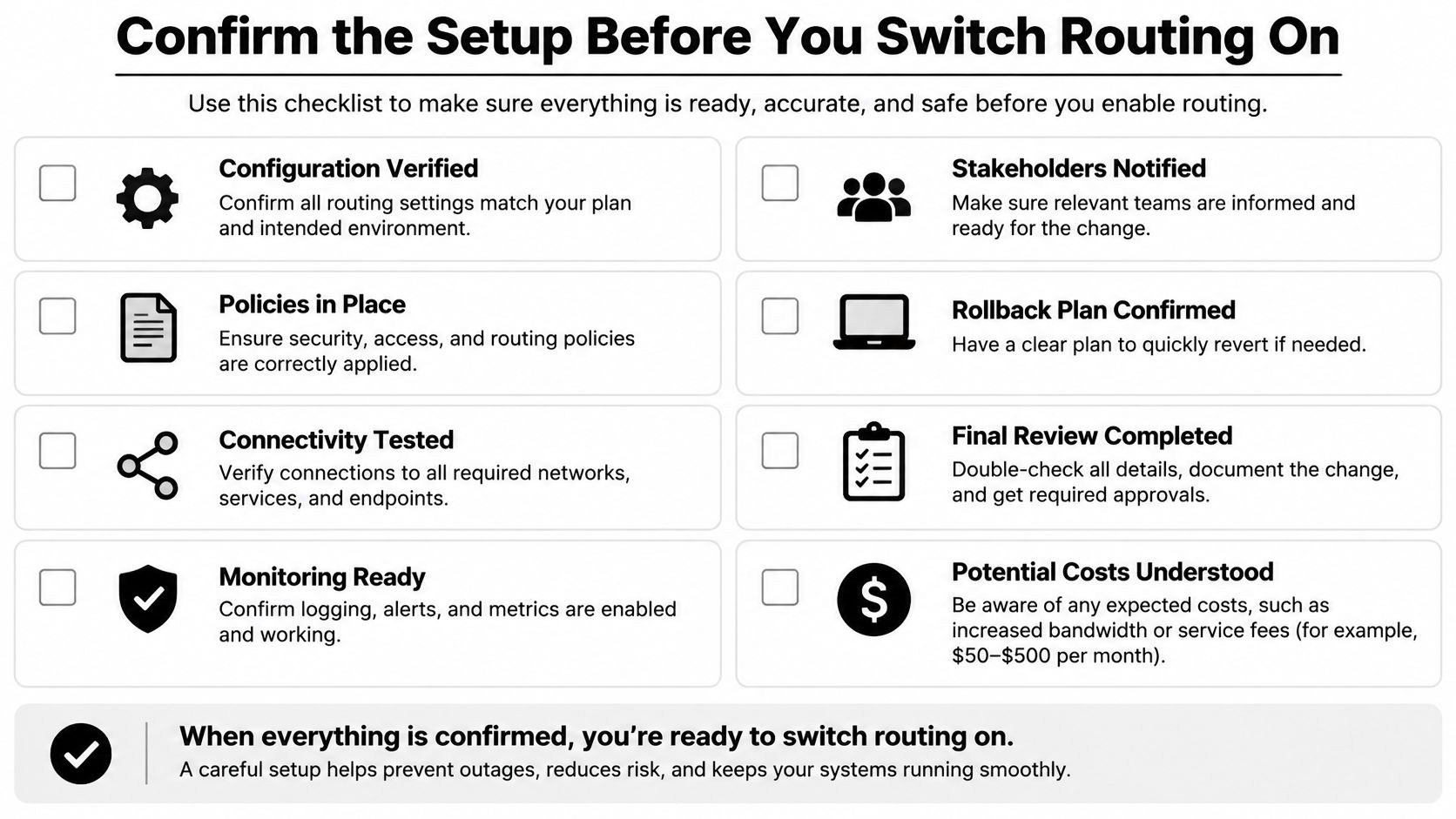
Hold outage-report, pr-risk, and urgent-safety on human approval until the floors hold for a full month of real traffic, including at least one weekend and one campaign. A quiet Tuesday is not a test.
The list I won't skip
- Owner and definition: every queue tag has a named owner and a written definition with two examples.
- Coverage gap: the blocklist only hides comments on content the Page created. Collaborator posts and other people's threads have a second process, usually the inbox rules, or they are invisible to the hide list.
- Replay: each rule has been run over the labelled sample, and disagreements are logged rather than smoothed over.
- Shadow floors: precision in shadow mode clears the floor for every tag you intend to route live.
- False-positive path: a hidden legitimate complaint can be unhidden and routed without a ticket to engineering.
- One-click override: any reviewer can change the queue tag, and that override is stored.
What you read every week
Track five numbers, by queue and by language where you have volume.
Auto-closure rate tells you how much left the queue without a person. If it jumps the same week overrides jump, you closed the wrong work. Response time against SLA per queue shows whether finance is fine while trust and safety is underwater. Override rate by tag is your drift alarm. A rising rate means tighten the rule or retrain. It does not mean adding reviewers to click past a bad rule. Legitimate comments hidden by the blocklist or the profanity filter is the customer-harm count. Tag accuracy by language stops you from declaring English results as the whole Page.
A unified inbox that holds the queues, the overrides, and those five metrics in one place beats stitching Page notifications, a spreadsheet, and a chat channel. The person on the queue should see why an item landed there and be able to send it elsewhere before a draft goes out.
Keep the human gate on anything that promises money, describes an outage in public, or touches safety. Automation can draft, cluster, and hide spam. It does not own those calls.
Sift AI pulls Facebook Page comments, mentions, and messages into one inbox, tags intent, and routes billing, outages, and press risk to the right owner while people approve the hard replies. If your Page queue is still a mix of public tags and hidden complaints, see how Sift AI keeps auto tagging inside the workflow instead of on the customer's timeline.